Machine Learning
10 Machine Learning Algorithms You'll Actually Use in Production
The 10 ML algorithms that solve most real-world problems - when to use each, what breaks in production, and runnable Python code for every one.
The algorithm isn’t the hard part
Most teams spend far too long picking machine learning algorithms and far too little time cleaning their data. I’ve watched engineers debate XGBoost vs. LightGBM for a week while their training set had duplicate rows and a leaking target variable. The algorithm selection rarely makes or breaks a project. Data quality, feature engineering, and how you frame the problem - those are the things that actually move the needle.
But you still need to know which tool fits which job. And the internet is drowning in “Top 10 ML Algorithms” articles that read like textbook glossaries - definitions copied from Wikipedia, no code you can run, no opinion on when to actually reach for one over another.
This article is different. These are the 10 algorithms I’ve seen solve the vast majority of real-world problems on tabular, text, and structured data. For each one, I’ll tell you when it works, when it doesn’t, and what tends to break in production. There’s runnable Python code throughout, using realistic data instead of foo and bar.
Scope: This guide covers classical and ensemble ML algorithms for structured data problems. Deep learning architectures (transformers, diffusion models) are a different conversation - I touch on neural networks at the end but only where they overlap with the same decision space.
How to choose: start with the problem, not the algorithm
Before scrolling through algorithm descriptions, answer three questions about your problem. First: what does your output look like? A number (regression), a category (classification), groups you don’t know yet (clustering), or too many input features to work with (dimensionality reduction). Second: how much data do you have, and how clean is it? Third: does anyone need to explain the model’s decisions to a regulator, a VP, or a patient?
Those three answers eliminate most of the wrong choices before you write a line of code.
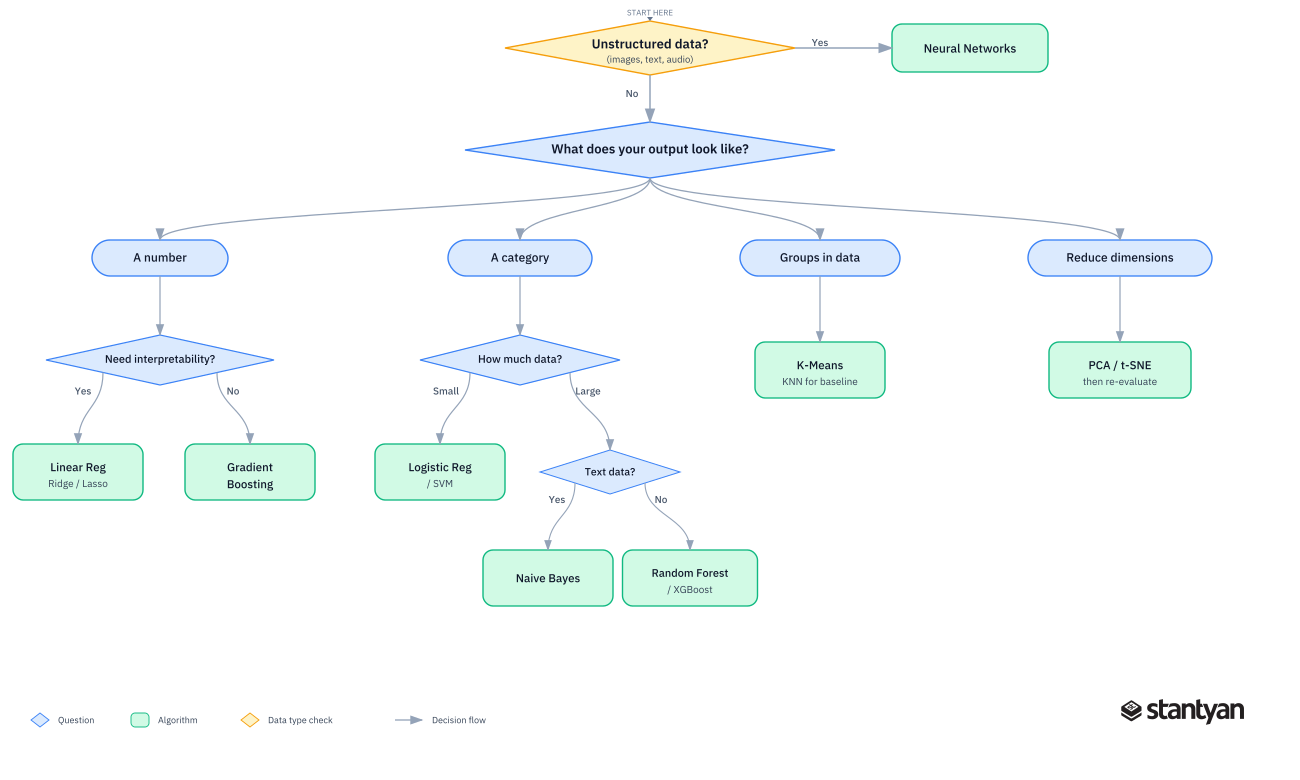
A simplified decision tree for choosing your first algorithm. Start with the output shape, then narrow by constraints.
The flowchart is a starting point, not a rulebook. In practice, you’ll try two or three algorithms and compare them on a holdout set. But starting with the right family saves you from wasting cycles on algorithms that were never designed for your problem shape.
1. Linear regression
Linear regression is the baseline that every other model gets compared against. It maps a straight-line (or hyperplane) relationship between input features and a continuous output. You’d be surprised how often a well-engineered linear model beats something fancier - especially when the dataset is small or the relationship between features and target is genuinely linear.
In practice, you almost never use vanilla linear regression. Ridge (L2 regularization) and Lasso (L1 regularization) are the real production defaults. Ridge handles multicollinearity without blowing up coefficients. Lasso does the same but also zeroes out weak features - useful when you want the model to tell you which inputs actually matter.
When to use it: Forecasting a continuous number (revenue, temperature, price), especially as a baseline. Also valuable when you need to explain exactly how each feature contributes to the prediction - every coefficient has a direct interpretation.
What breaks in production: Linear regression assumes a linear relationship. If the actual signal is nonlinear and you haven’t engineered polynomial or interaction features, the model will underfit badly. It’s also sensitive to outliers - a handful of extreme values can drag the whole fit line sideways.
import pandas as pd
import numpy as np
from sklearn.linear_model import Ridge
from sklearn.model_selection import train_test_split
from sklearn.metrics import mean_absolute_error

# Predict monthly spend from customer behavior features
np.random.seed(42)
n = 5000
df = pd.DataFrame({
    'sessions_per_month': np.random.poisson(12, n),
    'pages_per_session': np.random.lognormal(1.5, 0.4, n),
    'account_age_days': np.random.randint(30, 1200, n),
    'support_tickets': np.random.poisson(1.5, n),
})
# True relationship with some noise
df['monthly_spend'] = (
    15 * df['sessions_per_month']
    + 8 * df['pages_per_session']
    + 0.03 * df['account_age_days']
    - 12 * df['support_tickets']
    + np.random.normal(0, 30, n)
)

X = df.drop(columns='monthly_spend')
y = df['monthly_spend']
X_train, X_test, y_train, y_test = train_test_split(X, y, test_size=0.2, random_state=42)

model = Ridge(alpha=1.0)
model.fit(X_train, y_train)
preds = model.predict(X_test)

print(f"MAE: ${mean_absolute_error(y_test, preds):.2f}")
print("Feature weights:")
for name, coef in zip(X.columns, model.coef_):
    print(f"  {name}: {coef:.3f}")

# expected output:
# MAE: ~$23-25
# Feature weights close to the true coefficients (15, 8, 0.03, -12)
The coefficients come back close to the true weights we baked in. That’s the appeal - you can hand these numbers to a product manager and they’ll understand what drives the prediction.
2. Logistic regression
Despite the name, logistic regression is a classification algorithm. It predicts the probability of a binary outcome (yes/no, churn/retain, fraud/legitimate) by passing a linear combination of features through a sigmoid function that squashes the output between 0 and 1.
It’s the first model most teams ship for classification, and for good reason. It trains fast, produces calibrated probabilities out of the box, and every coefficient tells you the direction and magnitude of each feature’s effect. In regulated industries like finance and healthcare, where you need to explain why a model flagged something, logistic regression is often the only option that passes compliance review.
When to use it: Binary classification where interpretability matters. Credit scoring, churn prediction, A/B test analysis, medical screening. Also strong as a baseline before trying ensemble methods.
What breaks in production: Logistic regression draws a linear decision boundary. If the true boundary between classes is curved or involves feature interactions, the model will underperform unless you manually engineer those interaction terms. It also struggles with highly imbalanced classes unless you adjust class weights or the decision threshold.
from sklearn.linear_model import LogisticRegression
from sklearn.metrics import classification_report

# Reuse the customer data, but now predict churn
df['churned'] = ((df['support_tickets'] > 2) &
                 (df['sessions_per_month'] < 10)).astype(int)
# Add some noise to make it realistic
flip_idx = np.random.choice(n, size=int(n * 0.05), replace=False)
df.loc[flip_idx, 'churned'] = 1 - df.loc[flip_idx, 'churned']

X = df[['sessions_per_month', 'pages_per_session', 'account_age_days', 'support_tickets']]
y = df['churned']
X_train, X_test, y_train, y_test = train_test_split(X, y, test_size=0.2, random_state=42)

clf = LogisticRegression(class_weight='balanced', max_iter=1000)
clf.fit(X_train, y_train)
preds = clf.predict(X_test)

print(classification_report(y_test, preds, target_names=['retained', 'churned']))
# expected: reasonable precision/recall on both classes
Notice the class_weight='balanced' parameter. In most real churn datasets, churners are the minority class. Without balancing, the model learns to predict “not churned” for everything and still scores 90%+ accuracy - completely useless in practice.
3. Decision trees
A decision tree splits data by asking a series of yes/no questions about features, building a flowchart-like structure that ends in a prediction at each leaf. The single best thing about decision trees is that you can print one out and hand it to a non-technical stakeholder. They’ll understand it immediately.
The single worst thing is overfitting. An unconstrained decision tree will memorize every quirk in the training data, including the noise. That’s why you almost never deploy a lone decision tree in production - you use an ensemble of them (random forests or gradient boosting). But understanding how a single tree works is essential, because those ensembles are just clever combinations of trees.
When to use it: When you need a human-readable model for a rules-based system. Also useful for quick exploratory analysis - fit a shallow tree (depth 3-4) to a new dataset and you’ll immediately see which features and split points matter most.
What breaks in production: Deep trees overfit. Shallow trees underfit. And trees are inherently unstable - small changes in the training data can produce completely different tree structures. That instability is what makes ensembles so much better.
4. Random forests
Random forests solve the decision tree overfitting problem by training hundreds of trees, each on a random subset of the data and features, then averaging their predictions. The randomness decorrelates the trees, so the ensemble’s errors cancel out instead of compounding.
This is the “I don’t have time to tune hyperparameters” algorithm. With default settings, a random forest will give you a respectable model on almost any tabular dataset. It handles missing values reasonably (depending on the implementation), doesn’t need feature scaling, and produces useful feature importance scores.
When to use it: Your first serious model for classification or regression on tabular data, especially when you want something better than a linear model but don’t want to spend a day tuning. Good for datasets with mixed feature types (numeric + categorical) and moderate size (thousands to low millions of rows).
What breaks in production: Random forests are slow at inference time when you have hundreds of deep trees - each prediction requires traversing all of them. They also struggle with high-cardinality categorical features (like zip codes or user IDs) and tend to plateau in accuracy below gradient boosting on most benchmarks. Memory usage can get large with many deep trees.
5. Gradient boosting (XGBoost, LightGBM, CatBoost)
If you’re working on a tabular prediction problem and accuracy is what you care about most, gradient boosting is almost certainly your best bet. It trains trees sequentially, where each new tree focuses on correcting the errors the previous trees got wrong. The result is typically the highest accuracy you can get on structured data without reaching for deep learning.
Three implementations dominate production use. XGBoost was the Kaggle competition standard for years and remains rock-solid. LightGBM from Microsoft is faster on large datasets thanks to histogram-based splitting and leaf-wise tree growth. CatBoost from Yandex handles categorical features natively without one-hot encoding - a real advantage when your dataset is full of string columns.
When to use it: Classification or regression on tabular data when you want the best accuracy and can tolerate a less interpretable model. Fraud detection, credit scoring, demand forecasting, ranking systems. This is the algorithm behind most production ML systems at companies working with structured data.
What breaks in production: Gradient boosting is prone to overfitting if you crank up the number of trees without early stopping. Training is slower than random forests because trees are built sequentially (no parallelism across trees). And the models are harder to interpret - you get feature importance, but explaining a single prediction requires tools like SHAP.
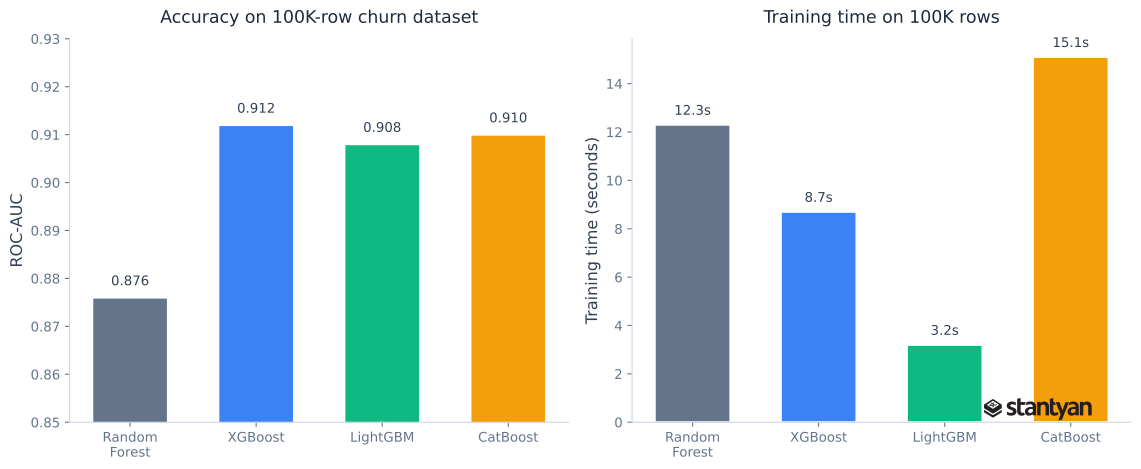
Typical benchmark on a 100K-row customer churn dataset. XGBoost and CatBoost edge out Random Forest on accuracy, while LightGBM trains fastest. Your mileage will vary by dataset.
from sklearn.ensemble import RandomForestClassifier
from xgboost import XGBClassifier
from sklearn.metrics import roc_auc_score
import time

# Compare Random Forest vs XGBoost on the churn data
models = {
    'Random Forest': RandomForestClassifier(n_estimators=200, random_state=42, n_jobs=-1),
    'XGBoost': XGBClassifier(n_estimators=200, learning_rate=0.1, max_depth=6,
                              random_state=42, eval_metric='logloss', verbosity=0),
}

for name, model in models.items():
    start = time.time()
    model.fit(X_train, y_train)
    elapsed = time.time() - start
    probs = model.predict_proba(X_test)[:, 1]
    auc = roc_auc_score(y_test, probs)
    print(f"{name}: AUC={auc:.4f}, trained in {elapsed:.2f}s")

# expected: XGBoost slightly higher AUC, both train in under a second on this size
The accuracy gap between random forests and gradient boosting is usually 2-5 percentage points on tabular data. Whether that gap matters depends on your business context. For a content recommendation system, probably not. For a fraud detection model processing millions of dollars in transactions, those few points translate directly into money.
6. Support vector machines
SVMs find the hyperplane that separates classes with the maximum margin - the widest possible gap between the nearest data points of each class. With kernel functions (RBF, polynomial), they can handle nonlinear boundaries by implicitly projecting data into higher-dimensional space.
SVMs had their golden era in the 2000s before gradient boosting and deep learning took over most benchmarks. But they still have a niche. On small-to-medium datasets (under ~50K rows) with clean features and a clear separation between classes, an RBF-kernel SVM can match or beat tree-based methods. They also perform well on high-dimensional data like text (with a linear kernel) where the number of features exceeds the number of samples.
When to use it: Small datasets with clear class boundaries. High-dimensional problems (text classification with TF-IDF features, genomic data). Situations where you need a strong classifier and don’t have enough data to train a large ensemble.
What breaks in production: Training time scales roughly quadratically with the number of samples - anything above 100K rows becomes painfully slow. SVMs don’t produce probability estimates natively (you need Platt scaling, which adds overhead). And they’re sensitive to feature scaling; if you forget to standardize your inputs, the model will silently produce garbage.
7. K-nearest neighbors
KNN is the simplest algorithm on this list. To predict a new data point, it finds the K closest training examples and takes a vote (classification) or average (regression). No training phase at all - the “model” is just the training data stored in memory.
That simplicity is both its strength and its fatal flaw. KNN works well as a sanity check, a recommendation system baseline (users who bought similar items), or a quick prototype. But it falls apart at scale because every prediction requires scanning the entire training set.
When to use it: Quick baselines, recommendation prototypes, anomaly detection (points far from their nearest neighbors are likely anomalies). Also useful in production for low-latency applications where you’ve precomputed approximate nearest neighbors using something like Faiss or Annoy.
What breaks in production: Prediction latency grows linearly with dataset size unless you use approximate nearest neighbor structures. KNN also suffers from the curse of dimensionality - in high-dimensional spaces, the concept of “nearest” becomes meaningless because all points are roughly equidistant. And it stores the entire training set in memory, which can be prohibitive for large datasets.
8. Naive Bayes
Naive Bayes applies Bayes’ theorem with a strong (and technically wrong) assumption: that all features are independent of each other. You’d think this would make it useless. It doesn’t. For text classification, Naive Bayes is absurdly effective relative to its simplicity.
The reason it works despite the broken assumption is that classification doesn’t require accurate probability estimates - it just needs to get the ranking right. And Naive Bayes tends to rank documents correctly even when the absolute probabilities are off, because the independence errors roughly cancel out across many features.
When to use it: Text classification at speed - spam filtering, sentiment analysis, document categorization, intent detection. Also a strong choice when you have very limited training data, because the model has so few parameters that it’s hard to overfit.
What breaks in production: Naive Bayes can’t capture feature interactions, so it underperforms on problems where correlations between features carry the signal. It also assigns zero probability to feature values it hasn’t seen in training (the “zero-frequency problem”), which you solve with Laplace smoothing but need to remember to configure.
from sklearn.naive_bayes import MultinomialNB
from sklearn.feature_extraction.text import TfidfVectorizer

# Simulated customer feedback classification
texts = [
    "The product broke after one week, terrible quality",
    "Amazing support team, resolved my issue quickly",
    "Shipping was slow and the package arrived damaged",
    "Love this product, exactly what I needed",
    "Refund process is a nightmare, still waiting",
    "Great value for the price, would recommend",
    "App keeps crashing, very frustrating experience",
    "Excellent build quality, feels premium",
    "Customer service hung up on me twice",
    "Best purchase I've made this year, so happy",
] * 50  # Repeat for a more realistic training set
labels = [0, 1, 0, 1, 0, 1, 0, 1, 0, 1] * 50  # 0=negative, 1=positive

vec = TfidfVectorizer(max_features=500, stop_words='english')
X_text = vec.fit_transform(texts)

nb = MultinomialNB(alpha=1.0)  # alpha=1.0 is Laplace smoothing
nb.fit(X_text, labels)

# Test on new feedback
new_texts = ["Terrible, the worst purchase ever", "Really impressed with the quality"]
new_X = vec.transform(new_texts)
for text, pred, prob in zip(new_texts, nb.predict(new_X), nb.predict_proba(new_X)):
    sentiment = "positive" if pred == 1 else "negative"
    print(f'"{text}" -> {sentiment} (confidence: {max(prob):.2f})')

# expected: correct sentiment labels with reasonable confidence
For a production text classifier, you’d replace the TF-IDF vectorizer with something more sophisticated - but Naive Bayes on TF-IDF features is still a solid first iteration that ships in an afternoon.
9. K-means clustering
K-means is the default unsupervised algorithm for finding groups in data. It partitions N observations into K clusters, where each observation belongs to the cluster with the nearest centroid. The algorithm iterates between assigning points to clusters and recomputing centroids until convergence.
The hard part isn’t the algorithm - it’s choosing K. The elbow method (plot within-cluster sum of squares against K and look for the “bend”) gives you a rough answer, but it’s often ambiguous. In practice, the right K is usually determined by the business question. “How many customer segments does our marketing team have capacity to target?” That’s a K=4 or K=5 answer, not a mathematical optimum.
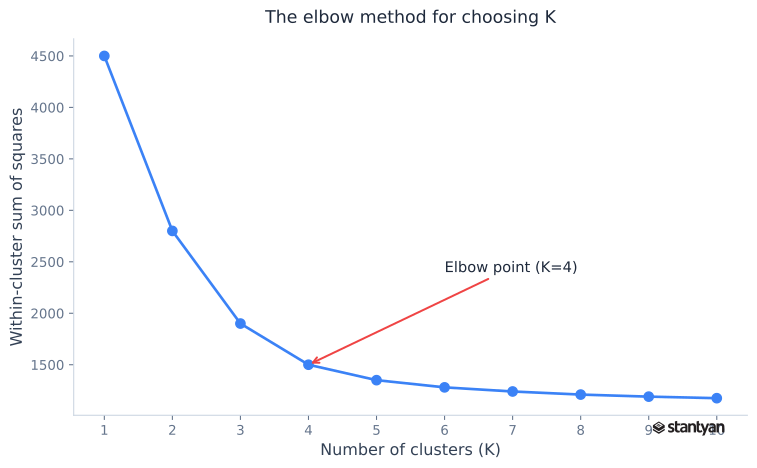
The elbow method for choosing K. The “elbow” at K=4 suggests four clusters - but in practice, the business context often matters more than the plot.
When to use it: Customer segmentation, document grouping, image compression, anomaly detection preprocessing (cluster the data, then flag points far from any centroid). Also useful as a feature engineering step - cluster assignments can become input features for a supervised model.
What breaks in production: K-means assumes spherical clusters of roughly equal size. If your real clusters are elongated, overlapping, or wildly different sizes, K-means will give misleading results. It’s also sensitive to initialization - always use init='k-means++' and n_init=10 (the scikit-learn defaults) to avoid getting stuck in bad local minima. And it requires you to specify K upfront, which means you need domain knowledge or a separate tuning step.
from sklearn.cluster import KMeans
from sklearn.preprocessing import StandardScaler

# Segment customers by behavior
customer_features = df[['sessions_per_month', 'pages_per_session',
                         'account_age_days', 'support_tickets']].copy()

# K-means needs scaled features
scaler = StandardScaler()
X_scaled = scaler.fit_transform(customer_features)

# Elbow method: try K from 1 to 10
inertias = []
for k in range(1, 11):
    km = KMeans(n_clusters=k, random_state=42, n_init=10)
    km.fit(X_scaled)
    inertias.append(km.inertia_)
    if k <= 5:
        print(f"K={k}: inertia={km.inertia_:.0f}")

# Fit with chosen K
km_final = KMeans(n_clusters=4, random_state=42, n_init=10)
df['segment'] = km_final.fit_predict(X_scaled)

print(f"\nCluster sizes:")
print(df['segment'].value_counts().sort_index())

# expected: 4 clusters of varying size with distinct behavior profiles
10. Neural networks
Neural networks are the foundation of deep learning - layers of interconnected nodes that learn hierarchical representations from data. For unstructured data (images, text, audio, video), they’re unmatched. CNNs dominate image tasks, transformers own NLP, and recurrent architectures handle sequential data.
But here’s the thing most “Top 10” articles won’t tell you: for tabular data - the kind most companies actually have - neural networks rarely beat gradient boosting. A 2022 study by Grinsztajn et al. confirmed what practitioners already knew: tree-based models consistently outperform deep learning on medium-sized tabular datasets. Neural networks need more data, more compute, more tuning, and produce less interpretable results.
When to use them: Unstructured data (images with CNNs, text with transformers, audio with spectrogram-based models). Transfer learning scenarios where you fine-tune a pretrained model. Very large tabular datasets (millions of rows) where you’ve exhausted tree-based approaches. And any problem where the data is inherently sequential or spatial.
What breaks in production: Everything. Neural networks require careful architecture selection, hyperparameter tuning, GPU infrastructure, longer training cycles, and specialized monitoring for issues like gradient collapse, distribution shift, and silent accuracy degradation. The operational overhead is an order of magnitude higher than deploying a scikit-learn model. Don’t reach for a neural network unless simpler approaches have genuinely hit a ceiling.
Picking the right one: a head-to-head comparison
This table is the reference you’ll actually use when starting a new project. Scan the columns that matter most for your constraints - interpretability, data requirements, or speed - and narrow from there.
| Algorithm | Best for | Interpretable? | Handles missing data? | Training speed | Data size sweet spot |
|---|---|---|---|---|---|
| Linear regression | Numeric prediction, baselines | High | No | Very fast | Any |
| Logistic regression | Binary classification | High | No | Very fast | Any |
| Decision tree | Explainable rules | Very high | Yes (some impls) | Fast | Small-medium |
| Random forest | General-purpose tabular | Medium | Partial | Medium | 1K-1M rows |
| Gradient boosting | Max accuracy on tabular | Low | Yes (XGB/LGBM) | Medium-slow | 10K-10M rows |
| SVM | Small data, high dimensions | Low | No | Slow at scale | Under 50K rows |
| KNN | Baselines, recommendations | Medium | No | None (lazy) | Under 100K rows |
| Naive Bayes | Text classification | Medium | N/A (text) | Very fast | Any |
| K-means | Customer segmentation | Medium | No | Fast | Any |
| Neural networks | Images, text, audio | Very low | Framework-dependent | Slow | 100K+ rows |
A few patterns worth noting. The interpretable algorithms (linear/logistic regression, decision trees) are also the fastest to train and deploy. The highest-accuracy algorithms (gradient boosting, neural networks) are the hardest to explain and the most expensive to operate. That’s not a coincidence - it’s a fundamental tradeoff in ML. Your job is to figure out where on that spectrum your problem sits.
So what?
Next time you start a new ML project, resist the urge to reach for the fanciest algorithm. Fit a logistic regression or Ridge regression first - it takes 10 minutes and gives you a baseline that’s often 80% of the way to the best possible result. If that baseline isn’t good enough, move to gradient boosting (XGBoost or LightGBM) on tabular data or a pretrained transformer for text. Skip the neural network unless your data is genuinely unstructured or you’ve exhausted simpler options. The algorithm that ships and gets monitored beats the algorithm that gets debated in a Slack thread.